

Happy Wednesday golfers. I hope you’ve got your pen and paper ready because this is a good one — I think.
A few weeks ago I had a reader reach out and pitch me an idea for a very interesting article.
Here is what he sent:
Hello Tommy! New subscriber and have been binging your articles. Top quality stuff. I think i’ve got a good topic for you. Along the lines of ‘different ways to use AI to improve your game’. I use AI a lot in my work as a data engineer and have tried to incorporate it into my game as much as i can. I’ll compile a few use cases and send them over to you.
So he ended up emailing me a document with various prompts he has tried along with the AI’s response and strategies to obtain the highest quality responses.
Using AI as a personal golf coach and caddie is a brilliant strategy, and one most players have barely begun to scratch the surface of.
Personally, I’ve used AI to break down my launch monitor metrics and scoring data to see how my game stacks up. But data tracking is really just the tip of the iceberg. AI-driven golf coaching is a wide-open frontier. It’s the Wild West of player development, and there are absolutely no rules.
So I decided to do some research and put together a list of the very best AI golf prompts for you. If you’re a premium subscriber, you can access the full list below:

Over time, I plan to add to this list. But for today’s article and for the sake of time, we will look at just a few.
Use Case 1: Breaking Down Your Round
Let’s start with one of the prompts my reader gave me in his document. This is one I have used in the past, but not with this level of detail.
Here is the prompt:
I am a [X] handicap who shot [SCORE] with the following stats: [X]/18 greens in regulation, [XX] putts, [X]/[X] fairways hit, [X]/[X] up-and-downs, [X] penalty shots. Please compare these stats to other golfers of my skill level, and tell me which areas I’m proficient in, and which areas I need to spend the most time on.
The key with this prompt in my own experience, is to continue using it after every round. The more the AI learns about you as a golfer, the more it can help you improve.
I sent Claude my stats after a few rounds and it immediately clocked me for hitting too many penalty shots. Turns out I was wasting away 1-2 strokes per round off the tee.
I kind of intuitively knew this to be true, but seeing it displayed in text right in front of me made it more real. So I immediately started focusing on hitting clubs off the tee that would ensure I stayed in play, and lo and behold I’ve stayed below 1 penalty shot per round ever since.
Here is a screenshot of what my reader sent me.
Here was his prompt and the AI’s response:
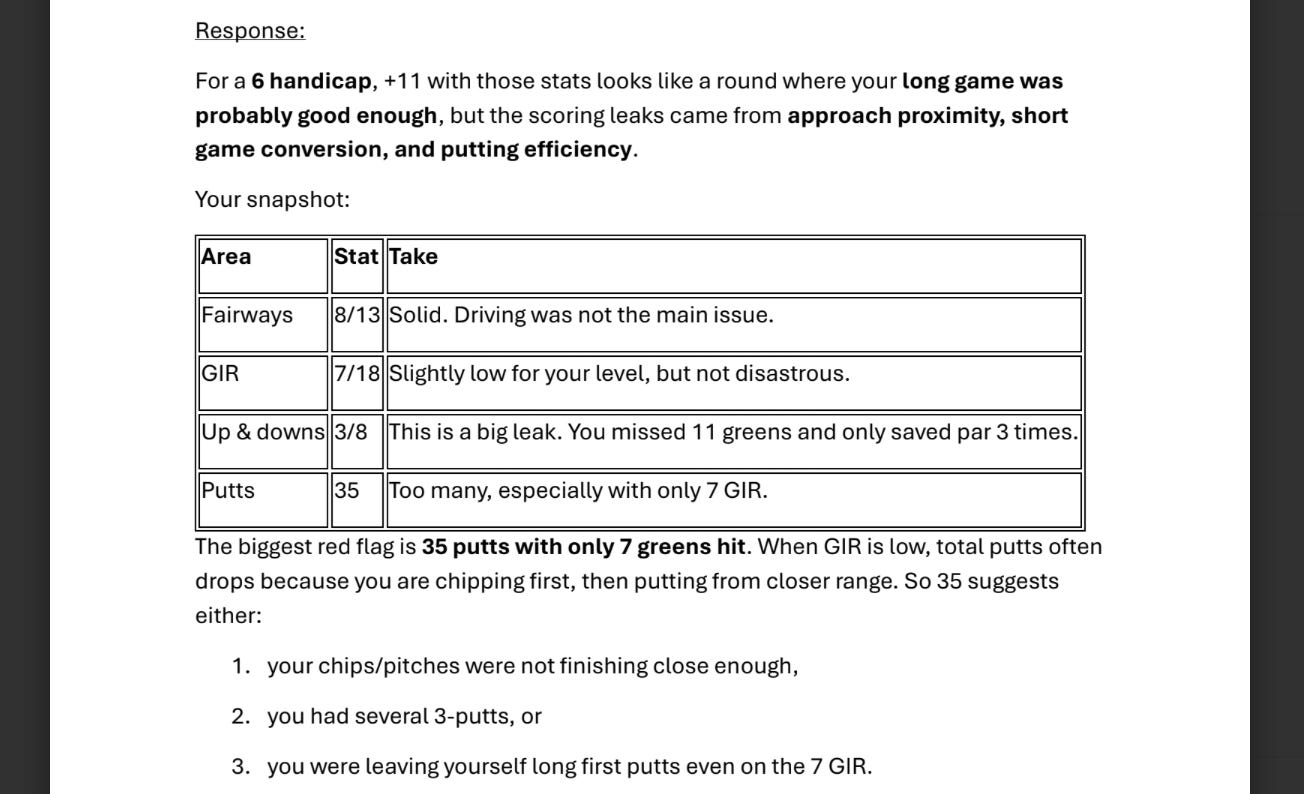
Right away the AI called him out for his putting in relation to his greens hit. Here is what it said:
The biggest red flag is 35 putts with only 7 greens hit. When GIR is low, total putts often drops because you are chipping first, then putting from closer range. So 35 suggests either:
1. your chips/pitches were not finishing close enough,
2. you had several 3-putts, or
3. you were leaving yourself long first putts even on the 7 GIR.
That is extremely valuable information for this golfer. 35 total putts on its own isn’t necessarily a red flag. But when paired with the information that he had only hit 7 GIR, it is a cause for concern.
This just reinforces the importance of feeding every bit of info about your round into the AI. It will spot holes in your game much quicker than most of you can.
Use Case 2: The Course Caddy
A great strategy for those of you playing a newer course or one that you’re still unfamiliar with.
I’m playing [COURSE NAME] for the first time. I am a [X] handicap and here are my carry distances for each club [INSERT CARRY DISTANCES]. Please research any public information on the course and give me a brief overview of what to expect, followed by a hole-by-hole, shot-by-shot strategy. Highlight holes where I can be aggressive or holes to be careful. Also any local knowledge tips if you have any.
This obviously works better for more popular courses. For example, I live in San Diego, so doing this for Torrey Pines would result in better results than a lesser known course.
I asked Claude to break down a local course I play and here was what it gave me. (I am leaving the name of the course out)
Par 72, with the whites at 6,459 and the blues at 6,869 — at your handicap, play the blues. Course rating 72.4, slope 126 from the tips. It's the hillier, more strategic of the two X courses: elevated tees, more elevation change, and more dynamic holes than the flat South course — including two par 3s perched on rises where a miss over the side wrecks your score. Greens are bent grass with paspalum fairways — recent reports say greens roll medium-quick and can play firm, with approach shots releasing more than expected, and it's a heavily played muni so expect ball marks.
Big picture for your game specifically: your documented leaks are scrambling and tee-shot penalties. This course punishes exactly that — side-hill drop-offs, doglegs, blind shots. The whole round is a discipline test, not a distance test. At 6,869 you'll have mostly mid-to-short iron approaches. Fairways-and-centers wins here.
I wouldn’t say this ground breaking information, but this was the very first prompt, with no follow up questions. So the more you press the AI and ask, the more it will give you. If you’re playing a course for the first time, any information is good information.
Just be sure to verify some of the info when you get there. It can make errors.
For those of you who are premium subscribers, go ahead and head over to AI Golf Prompt List to view the rest if you’re interested.
For the rest of you, I’ll see you Sunday.
Tommy
If you have any questions, comments, or feedback, please don’t hesitate to email me at tourswingstommy@gmail.com. I read everything.
Social Media: Make sure to follow me on X here.
If you haven’t read them yet, check out some of the most recent and popular Scoring Letter posts below:


I used AI to work up a practice routine for me. And I had it add Jack and Lee to a photo of me and a buddy at a scramble. 😂